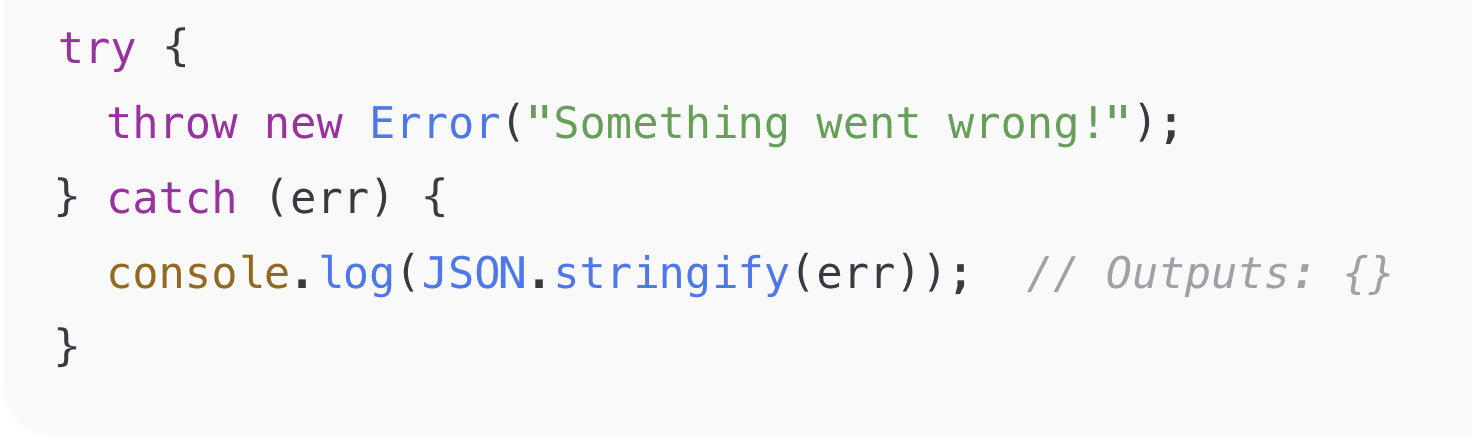
While working with JavaScript or Node.js, developers often face a confusing issue: when trying to stringify an Error object using JSON.stringify(), it returns an empty object {}.
This behavior raises several common questions:
Q. Why does JSON.stringify return {} for Error objects?
Q. Why doesn’t JSON.stringify throw an error for Error objects?
Q. Why does JSON.stringify not work inside a catch block?
In this article, we’ll break down why this happens and how to correctly serialize Error objects for logging, APIs, and debugging.
What Is JSON.stringify()?
JSON.stringify() is a JavaScript method that converts a JavaScript object into a JSON string. It is commonly used when sending data from a client to a server or when logging structured data.
JSON.stringify(obj);
How Does JSON.stringify Work?
When JSON.stringify() is called, it converts only the enumerable own properties of an object into JSON.
const obj = {
  name: "Alex",
  age: 20
};

console.log(JSON.stringify(obj));
// {"name":"Alex","age":20}
This works perfectly because both properties are enumerable. However, if an object contains only non-enumerable properties, JSON.stringify() has nothing to serialize.
What Is a Non-Enumerable Property?
A property is non-enumerable if it does not appear in:
Object.keys()for...in loopsJSON.stringify()
const obj = {};

Object.defineProperty(obj, 'hidden', {
  value: 'secret',
  enumerable: false
});

console.log(JSON.stringify(obj)); // {}
Since the property is non-enumerable, it is ignored during serialization.
Why JSON.stringify Returns {} for Error Objects
In JavaScript, Error objects are designed with non-enumerable properties.
Important properties such as:
are intentionally marked as non-enumerable. As a result, JSON.stringify() finds nothing to serialize and returns {}.
Example: JSON.stringify in a catch Block
try {
  throw new Error("Something went wrong!");
} catch (err) {
  console.log(JSON.stringify(err)); // {}
}
This is expected behavior and not a bug in JavaScript.
Solution: How to Properly Serialize an Error
Option 1: Manually Extract Error Properties
try {
  throw new Error("Something went wrong!");
} catch (err) {
  const errorDetails = {
    name: err.name,
    message: err.message,
    stack: err.stack,
  };

  console.log(JSON.stringify(errorDetails));
}
Option 2: Create a Reusable Helper Function
function serializeError(error) {
  return {
    name: error.name,
    message: error.message,
    stack: error.stack,
    ...(error.code && { code: error.code }),
    ...(error.cause && { cause: error.cause }),
  };
}

// Usage
console.log(JSON.stringify(serializeError(err)));
This approach is ideal for logging systems, APIs, and centralized error handling.
Best Practices
- Never rely on
JSON.stringify(error) directly
- Always extract error properties manually
- Use a helper function for consistency
- Include
stack only in non-production logs if needed
By following these practices, you’ll avoid silent logging issues and gain better visibility into runtime errors.
I hope this article helps! Feel free to comment with suggestions or improvements.
Prakash Pradhan
Sr. Software Engineer
Senior Software Engineer with 10+ years of experience in designing and scaling distributed systems and full-stack applications. Experts in optimizing system performance, and delivering high-impact technical solutions across the entire software development lifecycle.










Comments
No comments yet.